The fundamental capability of uCon (beyond being a basic terminal emulator) is to allow a remote user to telnet into the PC on which uCon is running and virtually attach to the same connection that uCon is locally attached to. The default configuration of the server is to start up on TCP port 8200. Then up to 8 simultaneous telnet clients can attach to the same uCon session; thus, allowing multiple users to have access to a single endpoint (note that this is in addition to the local access that the uCon session already has). The server can be configured to allow users to connect with or without a password. It can be set up to generate a welcome banner, and can also restrict the access of the remote user to read-only. This simply means that the remote user will be able to see what is going on but not send any commands to end point uCon is connected to. The menu item Servers->Telnet brings up the following dialog box:
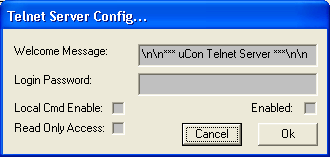
It allows the user to require remote clients to have unsecure access or if a password is specified, the client will have to enter the correct password to gain access. The opening header message is also configurable. There are two other configurable parameters:
Read-only access: this only allows remote clients to observe the current session without giving them the ability to input to the local system.
Local Command Enable: if the box is checked, then the client is able to issue remote commands to the PC running the uCon server.