MONCMD Server
uCon supports the ability to receive ASCII command strings via UDP. It uses the same mechanism as is built into MicroMonitor (aka uMon); hence, the uMon-host-tool called 'moncmd' (or uCon's script command called MONCMD) can be used to communicate with another uCon session whose MONCMD server has been turned on.
The 'moncmd' client (part of the freely available MicroMonitor package at the Microcross website ) is a tool that allows a developer to communicate (via UDP) with the command line interface of an embedded system running MicroMonitor.
The MONCMD server in uCon is essentially the same server built into it; hence, it can receive commands via the moncmd client.
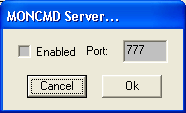
The menu item Servers->MONCMD brings up the following dialog box:
On the server side, there's not much to configure. It simply gets enabled or disabled, along with the port number (default being 777).
uCon uses the first white-space-delimited token of the incoming command line from moncmd to determine what
to do. As of this writing, the only token supported is "SCRCMD: ". With this as the first token, a moncmd client (or another uCon session using the MONCMD script command) can tell a uCon session to run any of uCon's script commands.
For example...
Assume we have a uCon session running on some PC whose IP address is 1.2.3.4, and the MONCMD server has been enabled to run on port 987. We can now use either the stand-alone 'moncmd' client or the MONCMD script command in uCon to 'talk' to this uCon session. Probably the most likely to be used is the "SEND" command, so we'll use that as the example. Assume, for example, that uCon's backend is attached to an embedded system's console port, and we want to issue the "reboot" command. The following command line would do this:
moncmd -p 987 1.2.3.4 "SCRCMD: SEND -n \"reboot\""
Being able to do this with the stand-alone 'moncmd' tool allows a user to communicate with a uCon session from any machine that the moncmd tool is built for (Linux, Unix, Solaris, PCWindows, etc...).
Similarly, if we chose to do this with a second uCon session, we would use the MONCMD script command as the client...
MONCMD -p 987 1.2.3.4 "SCRCMD: SEND -n \"reboot\""
This would be received by the uCon session running on PC 1.2.3.4, with the MONCMD server enabled on port 987 and it would then send the reboot string to the target it is attached to.