XMODEM File Transfer
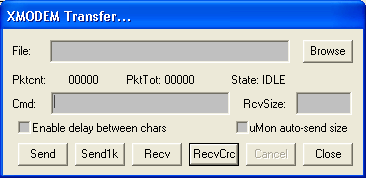
Click on the menu item Transfer->Xmodem to bring up the following dialog box that supports transfer of files over the serial port with XMODEM.
The XMODEM protocol is typically initiated at one end and that end assumes that the other end will respond. Usually XMODEM is used with interfaces that are not dedicated to the XMODEM file transfer protocol, so not only does the initiator have to start up the protocol, but the other end must be told to startup as well. This dialog box allows the initiator to automatically tell the other end to startup. This is done by specifying some command in the "Cmd:" window that will be sent by uCon to the other end. This command string should be whatever command is in that system that will tell it to start up the protocol. So, for example, if I was going to transfer the file "D:\tmp\leds.c" to the target, I would put that filename in the "File:" window, insert the appropriate command in the "Cmd:" window so that the target is ready for the transfer, and then click on the "Send" (or Send1k) button. In the above case, the target is assumed to be running MicroMonitor, so the MicroMonitor "xmodem" command (with options) is shown. Assuming the proper command was issued in the "Cmd:" window, the other end will start to receive the file. Upon completion, the dialog box will display the byte and packet count. During the transfer, the packet count will be incrementing.
Similar interaction would apply to a transfer in the other direction. In this case (file destined for the PC), it is possible to force the size of the file to be stored on the host ("RcvSize" text box). This is useful because XMODEM transfers in chunks of 128 (or 1024 with send1k) bytes, so if you know the actual size of the file being retrieved, you can eliminate the extra "modulo 128 (or 1024)" characters that would otherwise be appended.
If the target is slow and there is no flow control, then it may be necessary to check the "Enable delay between chars" button so that the character rate (not the baud rate) is slowed down. The amount of delay inserted as a result of this enabled checkbox is some number of milliseconds, as specified in the "Miscellaneous" dialog box found under menu item Config->Miscellaneous.
Updates:
<·><·>As of Jan 2007, a new button (Send1k) is added to the dialog box to support the ability to initiate a transfer using 1024-byte (i.e. 1K) packets instead of the default 128-byte packet.
<·><·>As of Feb 2007, another new button (RecvCrc) is added to support the ability to tell uCon to validate incoming packets using CRC instead of checksum.
<·><·>As of June 2006, this command allows automatic insertion of the -s### option into the xmodem command line. This is a uMon-specific option that will tell the uMon target the size of the file being transferred so that when stored into TFS, the exact filesize is used rather than the modulo-128 value of the download size. So, for example, if the line in the Cmd: text box was "xmodem -d -F filename", and the "uMon auto send size" box is checked, then uCon will change the command line to "xmodem -s ### -d -F filename" (where ### is the size of the file).